Choosing and Using Vintage: A Guide to Dazzling Color Fonts
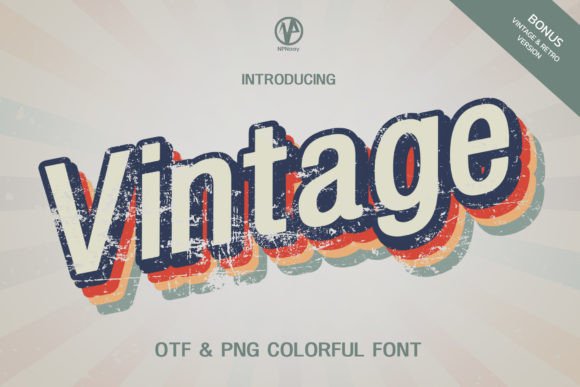
There's an undeniable charm to typography that evokes the past. The weight, texture, and color of a letterform can instantly transport a viewer to a different era, setting a powerful mood for a brand or project. This is precisely why a font like Vintage is so captivating. Described as a dazzling, thick, and eye-catching color font, it promises a retro aesthetic perfect for logos, invitations, and social media. However, the allure of a beautiful typeface can quickly fade if you run into technical roadblocks or design missteps. Understanding how to properly choose and apply this style of font is the key to achieving that sought-after professional finish.
Understanding the Appeal and the Technology
At its core, a color font like Vintage is more than just a shape; it's a complete graphic element embedded within the font file. Unlike traditional single-color fonts, color fonts can contain multiple colors, gradients, textures, and transparency effects. This makes them incredibly efficient for creating complex, eye-catching headlines and logos without needing to manually add effects in your design software. The "dazzling and thick" quality of Vintage suggests it’s built with bold strokes and integrated color fills, giving it that immediate vintage and retro impact.
The primary reason people are drawn to these fonts is their ability to deliver a high-impact visual with minimal effort. For a small business owner creating a quick social media graphic, or a designer developing a brand identity, a font like Vintage can be a shortcut to a polished, thematic look. It’s a tool for communication, instantly signaling a style—be it rustic, art deco, or mid-century modern—before a single word is read.
Avoiding Common Pitfalls with Vintage and Similar Fonts
The excitement of finding the perfect font can lead to overlooking critical details. Here are some of the most common mistakes people make with color fonts and how to avoid them, ensuring your project runs smoothly from concept to completion.
The Compatibility Conundrum: Software and Cutting Machines
This is arguably the most frequent and frustrating mistake. A designer purchases a beautiful color font like Vintage, only to discover it won't work in their primary tool. The product notes for Vintage clearly state compatibility with PhotoShop, Illustrator, Silhouette, and Inkscape. This is a crucial piece of information. Color fonts are a specialized technology, and not all software supports them equally.
Furthermore, the note that the OTF and TTF files are not compatible with Cricut is a vital warning for a huge segment of crafters and small business owners. Trying to use a color font in Cricut Design Space will often result in the software flattening the design into a single, solid color or simply failing to render it correctly. This turns your dazzling, multi-hued font into a plain, monochrome silhouette, completely defeating its purpose.
Better Approach: Always verify compatibility before you buy. If you are a dedicated Cricut user, you must look for fonts specifically marketed as "Cricut-friendly" or understand that you will only be using the font's basic outline shape. If you use Silhouette Studio, ensure you have a version (like Designer Edition or higher) that fully supports the advanced features of color fonts. When in doubt, consult the seller's Ultimate Font Guide or contact them directly.
Overlooking the Design Context
A font like Vintage is a statement piece. One common error is using it where it clashes with the overall design or message. For instance, pairing a thick, textured, retro font with a sleek, minimalist, modern layout can create visual dissonance. Similarly, using it for long paragraphs of body text is a recipe for disaster. Its intricate details and heavy weight are designed for impact, not for readability in small sizes or dense blocks.
Better Approach: Use Vintage strategically. It shines brightest as a headline, a logo wordmark, a single-word call-to-action on a poster, or on an invitation where it sets the entire tone. Pair it with a simpler, highly legible sans-serif or serif font for supporting text. This creates a clear visual hierarchy, allowing the Vintage font to grab attention without overwhelming the viewer. Think of it as the lead singer in a band; it needs a solid rhythm section (your body text) to truly perform.
Ignoring Color and Texture Interactions
Because Vintage is a color font, its built-in colors and textures are its defining features. A subtle but critical mistake is placing it on a background that fights with it. Placing a font with warm, earthy tones on a similarly colored background will make it disappear. Likewise, a textured font can get lost on a busy, patterned background.
Better Approach: Treat the font as a graphic element. Test it on different background colors—solid, gradient, or even a simple photograph. Often, a contrasting solid color (like placing a warm-toned Vintage font on a cool navy blue background) will make it pop. If you must place it over an image, look for areas of low detail or use a subtle overlay or shape behind the text to ensure legibility.
Skipping the Customization Step
Many users download a font and use it exactly as-is, which is fine, but they miss a huge opportunity. Even with a color font, you can make adjustments. In Adobe Illustrator, for example, you can often convert the text to outlines and then ungroup the letters to modify individual colors or even remove the texture to see the base shape. This allows you to tailor the font to your specific brand palette.
Better Approach: Don't be afraid to experiment after you've typed out your word. In compatible software, explore the options for editing the font as a vector object. Could you change one of the accent colors to match your brand's secondary color? Could you add a slight drop shadow to give it more depth? This level of customization moves you from being a font user to a font designer, creating a truly unique asset for your project.
Your Pre-Purchase Checklist for Vintage and Other Color Fonts
Before clicking "buy," run through this quick mental checklist to ensure you're making a smart investment that will elevate your work.
- Verify Your Software: Do you have Photoshop, Illustrator, Silhouette Designer Edition, or Inkscape? If your workflow is based in Canva, Procreate, or Cricut Design Space, this specific font is not the right tool for the job.
- Review the Full Character Set: Look beyond the main preview. Does the font include the numbers, punctuation, and special characters you need? Does it have multilingual support if required?
- Consider the Project's Scale: Where will this font be used? For a small business card, its thick, detailed nature might become a muddy blob. For a large-format poster or a website hero banner, it will be perfect.
- Read the Licensing: Understand what you're allowed to do. Can you use it for client projects? Can you use it on products for sale? The license dictates the terms of use, and it's your responsibility to adhere to them.
- Study the Seller's Resources: A good font creator provides support. Check for guides, FAQs, or tutorials. The existence of an Ultimate Font Guide is a strong positive signal that the seller is invested in your success with their product.
Ultimately, a font like Vintage