Mastering Modern Typography: The Versatility of the Vectura Font
In the realm of visual communication, typography is not merely about selecting letters to spell out words; it is the voice of the design. Whether you are crafting a startup’s brand identity, laying out a complex editorial magazine, or designing a responsive website, the typeface you choose dictates the tone, readability, and emotional resonance of your project. While there are thousands of fonts available, few manage to strike the delicate balance between neutrality and character. This is where Vectura enters the conversation, offering a refined solution for designers and professionals seeking a modern, versatile sans-serif typeface.
The Quest for the Perfect Neutral Sans-Serif
Many designers and brand managers face a common dilemma: finding a font that is professional enough for corporate environments yet modern enough for creative applications. Too often, typefaces fall into extremes. Some are overly decorative, rendering them unreadable in body text or inappropriate for serious business contexts. Others are so stark and utilitarian that they lack warmth, making a brand feel cold or robotic.
The challenge is finding a typeface that possesses timeless simplicity. You need a font that can disappear into the background when necessary to let the content shine, but also stand strong as a headline act. This is particularly true in digital environments where screen rendering can be unforgiving. Designers need typefaces that maintain their integrity across pixels and print, ensuring the message is never lost to technical limitations.
Understanding Vectura: Inspired by Legacy, Built for Today
Vectura is a refined and modern sans-serif font that draws inspiration from the timeless simplicity of Helvetica. For decades, Helvetica has been the gold standard for neutrality and legibility. However, design trends evolve, and there is a constant need for typefaces that honor that classic DNA while incorporating contemporary nuances. Vectura answers this call.
It is designed specifically for versatility. Unlike rigid typefaces that force a designer to work around their quirks, Vectura adapts to the user's needs. It is characterized by clean letterforms that prioritize legibility without sacrificing aesthetic appeal. The subtle alternates included in the font family allow for customization, enabling you to tweak specific letters to fit a unique brand voice or stylistic preference.
Exploring the Vectura Family: Styles and Weights
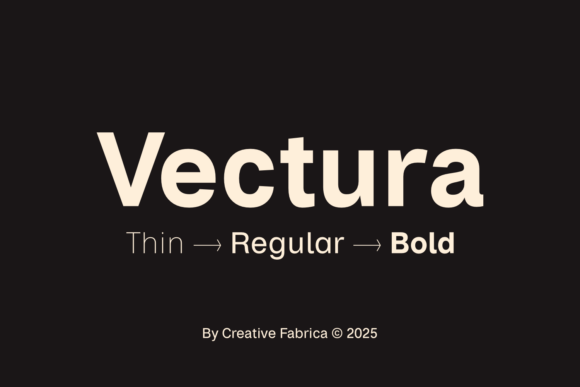
A font family is only as useful as its range of weights. A single weight often limits a designer's ability to create visual hierarchy—the system that guides a reader's eye from headlines to sub-headers and body copy. Vectura addresses this by offering a comprehensive suite of six distinct styles.
The Vectura family includes:
- Thin: Perfect for elegant, airy designs and large-scale display text where delicacy is key.
- Regular: The workhorse of the family, ideal for body text and general usage.
- Bold: Essential for headlines, call-to-action buttons, and emphasizing key information.
- Italic versions: Providing a necessary contrast for quotations, sub-headers, or stylistic flair.
This range ensures that you do not need to mix multiple typeface families to get the job done. You can build an entire design system using only Vectura, ensuring visual consistency and cohesion across all platforms.
Practical Applications and Use Cases
How does Vectura translate into real-world results? Its utility spans across various industries and project types. Here is how different professionals can leverage this typeface:
1. Branding and Corporate Identity
For businesses, trust is built through consistency. Vectura is ideal for corporate identities because it projects professionalism. Its clean lines suggest efficiency and modernity. A law firm might use the Bold weight for authority, while a tech startup might use the Thin weight to convey innovation. Because the font is so legible, it works beautifully on everything from business cards to large-format signage.
2. Editorial and Print Design
In magazines and brochures, readability is paramount. The spacing and structure of Vectura make it excellent for long-form reading. It avoids the "tired eye" effect that some geometric sans-serifs cause. You can use the Regular weight for columns of text and the Italic versions for pull quotes to break up the visual monotony and add rhythm to the layout.
3. Web Typography and UI Design
Web designers often struggle with fonts that look good in Photoshop but fail in the browser. Vectura is optimized for digital interfaces. Its clear letterforms ensure that buttons are readable and navigation is intuitive. Whether you are designing a minimalist landing page or a complex dashboard, Vectura provides the clarity needed for a seamless User Experience (UX).
Tailoring Vectura to Your Workflow
Different users will approach Vectura differently based on their specific goals. It is important to understand that typography is not "one size fits all."
The Minimalist Approach: If you are designing a high-end luxury brand, you might stick to the Thin and Regular weights. Use generous white space and let the elegance of the letterforms speak for themselves. This approach creates a feeling of exclusivity and sophistication.
The Impactful Approach: If you are designing for an event poster or a dynamic website, you can utilize the full contrast of the family. Pair a heavy Bold headline with a Regular body text. This creates a strong visual hierarchy that grabs attention immediately. The "subtle alternates" mentioned in the font's description can be used here to replace standard letters with more stylistic versions in headlines to add a unique flair.
Recommendations for Implementation
To get the most out of Vectura, consider these practical tips:
- Pay Attention to Tracking: While Vectura has excellent default spacing, adjusting the tracking (letter spacing) slightly can change the feel of the text. Wider tracking with the Thin weight creates a high-fashion look, while tighter tracking with the Bold weight creates a powerful, compact impact.
- Contrast is Key: Do not be afraid to mix weights. The contrast between the Thin and Bold versions is high, making it perfect for dramatic layouts.
- Check Rendering: Always test your chosen weight on different devices. While Vectura is designed for readability, checking how the Thin weight renders on lower-resolution screens is a good practice.
Conclusion
In a world saturated with visual noise, clarity is a superpower. Vectura offers a bridge between the classic reliability of Helvetica-inspired designs and the fresh demands of modern digital aesthetics. By providing a robust family of six styles, it empowers creators to build cohesive, readable, and elegant designs without compromise. Whether you are rebranding a major corporation or designing a personal portfolio, integrating Vectura into your toolkit ensures that your typography will always deliver elegance and functionality.